
Upgrading ACE on Minikube: from 13.0.4 to 13.0.6.2 (and unlocking MCP)
On this page
- Assumptions
- Step 0: Where am I, exactly?
- Step 1: Pick a target operator version
- Step 2: Back up before you touch anything
- Step 3: Helm upgrade the Operator
- Operator upgrade issue: --reuse-values reuses the old rendered manifest
- Step 4: Watch the operator notice the new operand
- Step 5: The license rebadge that catches everyone
- Container issue: mcpruntimecerts volume mount fails before secret exists
- Step 6: Verify
- Image issue: stale custom image overrides
- Ingress issue: 404 when opening the dashboard after the upgrade
- Verifying MCP support is there
- Step 7: Update the repo to match reality
- Rollback
- Long story short
- References
In the previous post, we set up IBM App Connect Enterprise (ACE) on
Minikube end-to-end: Operator, Dashboard, an IntegrationRuntime, ingress, the works. That installation pinned the Operator at
12.14.0 and the Dashboard at version: '13.0', which resolved to operand 13.0.4.x-r1 at the time.
Time moves on. IBM released operand 13.0.6.2-r1 on 2026-02-20, and with the 13.0.6.1-r1 line they shipped
MCP server support in the Designer. That’s the feature I want to play with, so this post walks through upgrading the
running cluster from 13.0.4.2-r1 to 13.0.6.2-r1. The interesting bits are the operator-to-operand version matrix and
a license-ID rebadge the operator silently blocks on.
Just like my original blog, I’ll add some possible issues (which I may or may not have encountered and got frustrated about) here and there, so you can fix them fast if you hit them too.
Assumptions
- You already have an ACE setup like the one from the previous blog (Operator via Helm, Dashboard CR, an IntegrationRuntime created from the UI quickstart).
- You’re on the
ibm-helm/ibm-appconnect-operatorchart, not OLM. - You’re working with
kubectlandhelmin PowerShell on Windows.
Step 0: Where am I, exactly?
Before changing anything, take stock. Things drift, especially when you’ve been clicking around in the dashboard. Run a read-only pass and write down the exact versions you see. You’ll need them for the rollback path.
k get nodes
NAME       STATUS   ROLES           AGE    VERSION
minikube   Ready    control-plane   257d   v1.33.1

k get pods
NAME                                  READY   STATUS    RESTARTS         AGE
ace-dashboard-dash-d7b48ffb9-v65mt    2/2     Running   6 (3h29m ago)    213d
ibm-appconnect-5c58d87c49-szv2p       1/1     Running   9 (3h29m ago)    257d
ir-01-quickstart-ir-65bf799dd-gtkls   1/1     Running   24 (3h28m ago)   257d

helm list -A
NAME            NAMESPACE       REVISION  UPDATED                                STATUS    CHART                            APP VERSION
ace-ai-agents   ace-agent-demo  1         2025-11-04 15:32:44.3458376 +0100 CET  deployed  ace-ai-agents-0.1.0              0.1.0
ibm-appconnect  ace-agent-demo  1         2025-10-28 14:26:37.5172124 +0100 CET  deployed  ibm-appconnect-operator-12.16.0  12.16.0
ibm-appconnect  ace-demo        1         2025-09-03 07:00:40.5572517 +0200 CEST deployed  ibm-appconnect-operator-12.15.0  12.15.0
For me this returned a Helm release of ibm-appconnect on chart ibm-appconnect-operator-12.15.0 in ace-demo, with
three pods running: the operator, the Dashboard, and the runtime.
Check the operand versions on the CRs:
k get dashboard ace-dashboard -o jsonpath='spec.version={.spec.version} reconciled={.status.versions.reconciled}{"\n"}'
spec.version=13.0 reconciled=13.0.4.2-r1

k get ir ir-01-quickstart -o jsonpath='spec.version={.spec.version} reconciled={.status.versions.reconciled}{"\n"}'
spec.version=13.0 reconciled=13.0.4.2-r1
And the actual images on the running pods, because the CR doesn’t always reflect what’s actually running:
k get pod -l app.kubernetes.io/managed-by=ibm-appconnect -o jsonpath='{range .items[*]}{.metadata.name}{"\n"}{range .spec.containers[*]}  {.name}: {.image}{"\n"}{end}{end}'
ace-dashboard-dash-d7b48ffb9-v65mt
  control-ui: cp.icr.io/cp/appc/acecc-dashboard-prod:TS019983934-debug-20250901-160233
  content-server: cp.icr.io/cp/appc/acecc-content-server-prod:13.0.4.2-r1
ir-01-quickstart-ir-65bf799dd-gtkls
  runtime: cp.icr.io/cp/appc/ace-server-prod:13.0.4.2-r1
Save these somewhere. You’ll thank yourself if the upgrade goes sideways.
I pity the fool who doesn’t save the current state.
Step 1: Pick a target operator version
ACE has an operator-to-operand compatibility matrix. Operand 13.0.6.2-r1 requires App Connect Operator 12.21.0 or
higher. You can verify this in the operand versions and features
table on IBM Docs.
Why not just go to the latest chart in the repo? Refresh the index and list available Helm chart versions:
helm repo update ibm-helm
helm search repo ibm-helm/ibm-appconnect-operator --versions
NAME                            	CHART VERSION	APP VERSION	DESCRIPTION
ibm-helm/ibm-appconnect-operator	13.1.0       	13.1.0     	A chart to deploy the IBM App Connect Operator ...
ibm-helm/ibm-appconnect-operator	13.0.0       	13.0.0     	A chart to deploy the IBM App Connect Operator ...
ibm-helm/ibm-appconnect-operator	12.21.0      	12.21.0    	A chart to deploy the IBM App Connect Operator ...
ibm-helm/ibm-appconnect-operator	12.20.1      	12.20.1    	A chart to deploy the IBM App Connect Operator ...
...
These Helm charts don’t directly tell you the operand version they produce. For that, IBM publishes the CASE-to-Application-Version table at ibm.github.io/cloud-pak/assets/html/ibm-appconnect-table.html. The relevant rows for this upgrade:
| Operator chart | Operand it produces |
|---|---|
12.21.0 | 13.0.6.2-r1 |
13.0.0 | 13.0.7.0-r1 |
13.1.0 | 13.0.7.1-r1 |
I’m picking 12.21.0 because it lands on exactly the operand I’m targeting in this post: 13.0.6.2-r1. Jumping to
13.0.0 or 13.1.0 would actually give me a newer operand on the same 13.0.x line (13.0.7.x), unlocking even more
MCP knobs in server.conf.yaml. But this post is the conservative-upgrade story, one chart-minor at a time, so I’m
stopping at 12.21.0.
Step 2: Back up before you touch anything
If something goes wrong, you want the live CRs somewhere easy to reach. Dump them outside of source control (no need for these to be versioned), just in case you don’t follow this guide to the letter and break everything. Don’t say I didn’t warn you.
$BK = "D:\GIT\ace-minikube\backups\pre-13.0.6.2-r1"
New-Item -ItemType Directory -Force -Path $BK | Out-Null
k get dashboard ace-dashboard -o yaml | Out-File -Encoding utf8 "$BK\dashboard.yaml"
k get ir ir-01-quickstart -o yaml    | Out-File -Encoding utf8 "$BK\ir-01-quickstart.yaml"
k get pvc ace-dashboard-content -o yaml | Out-File -Encoding utf8 "$BK\pvc.yaml"
helm get values ibm-appconnect -n ace-demo | Out-File -Encoding utf8 "$BK\helm-values.yaml"
helm get manifest ibm-appconnect -n ace-demo | Out-File -Encoding utf8 "$BK\helm-manifest.yaml"
The helm get values snapshot is the most important one. It tells you exactly which user-supplied values you’ll need to
preserve across the upgrade.
Step 3: Helm upgrade the Operator
The cleanest path is a helm upgrade with explicit values via —reset-values. Using —reuse-values is tempting but Helm will silently keep image pins from the old chart and your upgrade will quietly become a no-op (see the issue box at the end of this step). Here’s the clean approach:
Take your existing ace-operator-values.yaml and update the tag field to 12.21.0:
# ace-operator-values.yaml
namespace: "ace-demo"
operator:
  replicas: 1
  deployment:
    repository: icr.io/cpopen
    image: appconnect-operator
    tag: 12.21.0                       # was 12.14.0
    pullPolicy: Always
    resources:
      requests:
        cpu: "100m"
        memory: 128Mi
      limits:
        cpu: "250m"
        memory: 1Gi
  installMode: OwnNamespace
  imagePullSecrets:
    - ibm-entitlement-key
Apply it:
helm upgrade ibm-appconnect ibm-helm/ibm-appconnect-operator --version 12.21.0 -n ace-demo --reset-values -f ./ace-operator-values.yaml
Release "ibm-appconnect" has been upgraded. Happy Helming!
NAME: ibm-appconnect
LAST DEPLOYED: Mon May 18 20:46:42 2026
NAMESPACE: ace-demo
STATUS: deployed
REVISION: 3
The operator deployment will roll. Watch the pod come up:
k get pods
NAME                              READY   STATUS    RESTARTS   AGE
ace-dashboard-dash-...            2/2     Running   1          213d
ibm-appconnect-5c58d87c49-szv2p   1/1     Running   9          257d    # old
ibm-appconnect-856bb956d8-5gfl6   0/1     ContainerCreating 0   10s    # new
ir-01-quickstart-ir-...           1/1     Running   24         257d
Once the new pod is Ready, verify it’s actually running 12.21.0:
k logs deploy/ibm-appconnect | grep "Operator Version"
ts=2026-05-18T18:47:31.040184069Z level=info logger=setup msg="Operator Version: 12.21.0"
Operator upgrade issue: --reuse-values reuses the old rendered manifest
My first attempt was lazy: helm upgrade ... --reuse-values --set operator.deployment.tag=12.21.0. Helm reported REVISION: 2 and a successful upgrade. But the operator deployment didn’t change. The pod kept running.
k get deploy ibm-appconnect -o jsonpath='{.metadata.annotations.deployment\.kubernetes\.io/revision}'
1
Revision 1. The deployment wasn’t touched.
What was happening: chart 12.15.0 (the chart I was upgrading from) pinned the operator image with an explicit sha, while
chart 12.21.0 uses a different default sha. With --reuse-values, Helm reused the previously-rendered values from chart
12.15.0’s defaults (including the old sha), and the new chart kept using the old sha and ignored my new tag. End result:
same image, same pod, no upgrade.
k get deploy ibm-appconnect -o jsonpath='{.spec.template.spec.containers[0].image}{"\n"}'
icr.io/cpopen/appconnect-operator@sha256:80ef372b7f5e4823084afbc0f80257781906661f1cab7b1877650596e00a2c86   # still the old one
“Have you tried turning it off and on again?” - Roy, The IT Crowd
Fix: re-run with --reset-values --values ./ace-operator-values.yaml so Helm starts from the new chart’s defaults and your
file’s overrides. No leftover state from the old release. After that, the deployment rolled correctly:
k get deploy ibm-appconnect -o jsonpath='{.spec.template.spec.containers[0].image}{"\n"}'
icr.io/cpopen/appconnect-operator@sha256:d8636f2f558ced3c085cbe635a8d47e9e587407e2f7bf5aaf453340a500f3600   # new chart 12.21.0
If you only ever bump within the same chart minor, --reuse-values is fine. If you cross chart majors or even some minors,
prefer --reset-values and re-supply your overrides.
Step 4: Watch the operator notice the new operand
The Dashboard CR has version: '13.0', a floating selector. The operator picks whichever 13.0.x patch it considers
current. With the operator at 12.21.0, that resolves to 13.0.6.2-r1. Same goes for the IR.
You don’t have to edit the CRs for this. Just watch the operator log right after it starts up:
k logs deploy/ibm-appconnect --tail=50
...
ts=2026-05-18T18:48:07.197897081Z level=info logger=controller.integrationruntime msg="13.0.6.2-r1 reconcile" Request.Namespace=ace-demo Request.Name=ir-01-quickstart
ts=2026-05-18T18:48:07.197959401Z level=info logger=controller.dashboard msg="13.0.6.2-r1 reconcile" Request.Namespace=ace-demo Request.Name=ace-dashboard
That’s the operator deciding to roll the Dashboard and IR pods to the new operand. Except it doesn’t. The pods stay on
13.0.4.2-r1. What gives?
Look further down:
ts=2026-05-18T18:48:07.227594535Z level=info logger=controller.integrationruntime msg="Channel 13.0 resolves to the latest compatible version 13.0.6.2-r1 which requires license L-CKFT-S6CHZW. Update your CR to use this license. For more information, see https://ibm.biz/acelicense-v13." Request.Namespace=ace-demo Request.Name=ir-01-quickstart
ts=2026-05-18T18:48:07.325873065Z level=info logger=controller.integrationruntime msg="Successfully created Event: [action]=Warning, [reason]=WrongLicense, [note]=Channel 13.0 resolves to the latest compatible version 13.0.6.2-r1 which requires license L-CKFT-S6CHZW..."
The operator is blocking on the license ID.
Step 5: The license rebadge that catches everyone
In the original blog, I configured the CRs to use the appropriate license for that version:
license:
  accept: true
  license: L-KPRV-AUG9NC
  use: AppConnectEnterpriseNonProductionFREE
IBM rotates these license IDs when they cut new operand patches. The L-KPRV-AUG9NC ID was tied to operand 13.0.4.x /
13.0.5.x. For operand 13.0.6.x (which is what the operator wants to upgrade you to), the new ID for the same
AppConnectEnterpriseNonProductionFREE tier is L-CKFT-S6CHZW. Same product, same tier, same accept: true. Just a
new ID string.
The URL in the operator’s warning event (https://ibm.biz/acelicense-v13) is where IBM lists what each operand patch expects. Check it for your specific operand before patching blindly.
Patch both CRs:
k patch dashboard ace-dashboard --type merge -p '{"spec":{"license":{"license":"L-CKFT-S6CHZW"}}}'
dashboard.appconnect.ibm.com/ace-dashboard patched

k patch ir ir-01-quickstart --type merge -p '{"spec":{"license":{"license":"L-CKFT-S6CHZW"}}}'
integrationruntime.appconnect.ibm.com/ir-01-quickstart patched
If you keep your CRs as YAML in git (you should), also update ace-dashboard.yaml:
spec:
  license:
    accept: true
    license: L-CKFT-S6CHZW                   # was L-KPRV-AUG9NC
    use: AppConnectEnterpriseNonProductionFREE
Within a few seconds, the operator picks up the change, the warning event clears, and the rollouts start:
k get pods
NAME                                   READY   STATUS              RESTARTS    AGE
ace-dashboard-dash-5666c86887-fltqw    0/2     ContainerCreating   0           8s     # new dashboard
ace-dashboard-dash-d7b48ffb9-v65mt     2/2     Running             6           213d   # old, will terminate
ibm-appconnect-856bb956d8-5gfl6        1/1     Running             0           137m
ir-01-quickstart-ir-59759b9674-n9jzz   0/1     ContainerCreating   0           7s     # new IR
ir-01-quickstart-ir-65bf799dd-gtkls    1/1     Running             24          257d   # old, will terminate
The dashboard typically rolls in 30-60 seconds. The runtime takes a lot longer the first time because it has to pull the
new ace-server-prod:13.0.6.2-r1 image, which is about 1+ GB. On a slow connection from Minikube to cp.icr.io,
budget 15-20 minutes for that pull alone. There’s no progress indicator beyond ContainerCreating, which can feel like a
hang. It isn’t. kubectl describe pod will show the Pulling image event.
Container issue: mcpruntimecerts volume mount fails before secret exists
While the new IR pod was waiting on the image pull, I noticed an earlier warning event:
k describe pod ir-01-quickstart-ir-59759b9674-n9jzz
...
Events:
  Warning  FailedMount  16m  kubelet  MountVolume.SetUp failed for volume "mcpruntimecerts" : secret "ir-01-quickstart-ir-servingssl-cert" not found
This is a new volume the 13.0.6.x operand mounts for MCP server TLS material. The secret is created by the operator
shortly after the pod is scheduled, so the mount eventually succeeds. But there’s a small window at first reconcile where
the pod gets scheduled before the secret exists. Kubelet retries, and the pod proceeds once the secret lands. No action
needed unless the error persists past the first minute or two.
Step 6: Verify
Once both pods are running, check that everything actually moved to the new operand.
k get dashboard,ir
NAME                                         RESOLVEDVERSION   REPLICAS   CUSTOMIMAGES   STATUS   ...   AGE
dashboard.appconnect.ibm.com/ace-dashboard   13.0.6.2-r1       1          true           Ready          257d

NAME                                                     RESOLVEDVERSION   STATUS   REPLICAS   ...
integrationruntime.appconnect.ibm.com/ir-01-quickstart   13.0.6.2-r1       Ready    1
The real proof is in the image references on the running pods, not the CR resolvedVersion. Check those too:
k get pod -l app.kubernetes.io/managed-by=ibm-appconnect -o jsonpath='{range .items[*]}{.metadata.name}{"\n"}{range .spec.containers[*]}  {.name}: {.image}{"\n"}{end}{end}'
ace-dashboard-dash-5666c86887-fltqw
  control-ui: cp.icr.io/cp/appc/acecc-dashboard-prod:TS019983934-debug-20250901-160233
  content-server: cp.icr.io/cp/appc/acecc-content-server-prod:13.0.6.2-r1-20260222-011707@sha256:d421f65a...
ir-01-quickstart-ir-59759b9674-n9jzz
  runtime: cp.icr.io/cp/appc/ace-server-prod:13.0.6.2-r1-20260224-175720@sha256:defa024e...
A note on the :r1-20260224-175720 suffix: that’s the operand’s actual build timestamp, useful if you ever need to
correlate a specific image to a Fix Central download.
Image issue: stale custom image overrides
If at some point you set a custom image on the Dashboard CR (e.g. spec.pod.containers.control-ui.image) to chase a bug,
the operator will respect that override across upgrades. Convenient. But it means that container won’t auto-bump to the
new operand. You’ll see CUSTOMIMAGES true in k get dashboard and the pod will still run the old custom image.
If the original reason for the override is gone, drop the field so the operator picks the bundled image again:
k patch dashboard ace-dashboard --type=json -p='[{"op":"remove","path":"/spec/pod/containers/control-ui/image"}]'
dashboard.appconnect.ibm.com/ace-dashboard patched
The dashboard pod rolls within a minute, and CUSTOMIMAGES flips back to false. Same trick applies for any per-container
image override on Dashboard or IR: remove the image: field, the operator takes over again.
Browse to the dashboard and confirm ir-01-quickstart still appears in the IntegrationRuntimes list, and that the hello-world
flow still serves:
Invoke-WebRequest "https://ir01.local:12122/world/hello" -UseBasicParsing -SkipCertificateCheck
StatusCode        : 200
Content           : {"message":"Hello, Foo Bar!"}
Ingress issue: 404 when opening the dashboard after the upgrade
This one isn’t directly caused by the upgrade, but the upgrade is when you notice it. I set up the same port-forward from the installation blog:
k -n ingress-nginx port-forward svc/ingress-nginx-controller 12121:443Opened https://ace-dash.local:12121/, clicked through the self-signed cert warning, and got a 404.
Two separate causes, both at once.
Cause 1: the dashboard ingress wasn’t there anymore. Somewhere between the installation and the upgrade, the
ace-dashboard-ingress resource in the ace-demo namespace got deleted (probably a cleanup pass that went one step too
far). nginx had no rule for any host, so it 404’d everything.
k -n ace-demo get ingress
No resources found in ace-demo namespace.
Cause 2: another instance had grabbed the hostname. When I re-applied the original ace-dashboard-ingress.yaml
(which uses host: ace-dash.local), the nginx admission webhook rejected it:
k apply -f ace-dashboard-ingress.yaml
Error from server (BadRequest): admission webhook "validate.nginx.ingress.kubernetes.io" denied the request:
host "ace-dash.local" and path "/apiv2" is already defined in ingress ace-agent-demo/ace-dashboard-ingress
I’d built another ACE runtime in an ace-agent-demo namespace a while back for something unrelated, and that dashboard
ingress had grabbed ace-dash.local. Two installs, one hostname, nginx picks the first one, which in my case was the
wrong one.
Fix: give the ace-demo dashboard a hostname the other instance isn’t using. The TLS cert in
secret/ace-dashboard-tls already covered ace-dashboard.local (the original hostname), and the Windows hosts file
already had 127.0.0.1 ace-dashboard.local, so I just pointed the ingress back at that:
# ace-dashboard-ingress.yaml
spec:
  tls:
    - hosts:
        - ace-dashboard.local     # was ace-dash.local
      secretName: ace-dashboard-tls
  rules:
    - host: ace-dashboard.local   # was ace-dash.local
      http:
        paths:
          - path: /apiv2
            pathType: Prefix
            backend: { service: { name: ace-dashboard-dash, port: { number: 8300 } } }
          - path: /
            pathType: Prefix
            backend: { service: { name: ace-dashboard-dash, port: { number: 8300 } } }
k apply -f ace-dashboard-ingress.yaml
ingress.networking.k8s.io/ace-dashboard-ingress createdNow https://ace-dashboard.local:12121/ lands on the upgraded ace-demo dashboard.
Verifying MCP support is there
Now e finally arrive at the whole point of the upgrade. From the dashboard, open the left-hand menu and navigate to the MCP servers section.
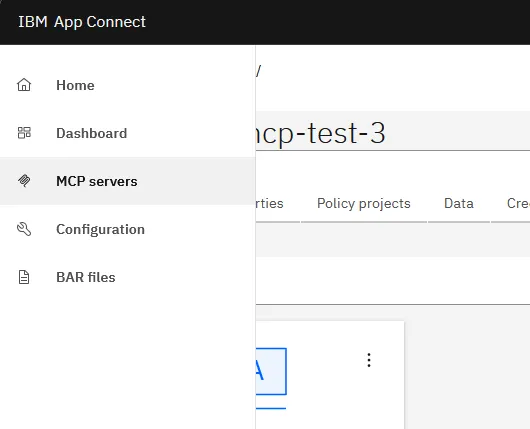
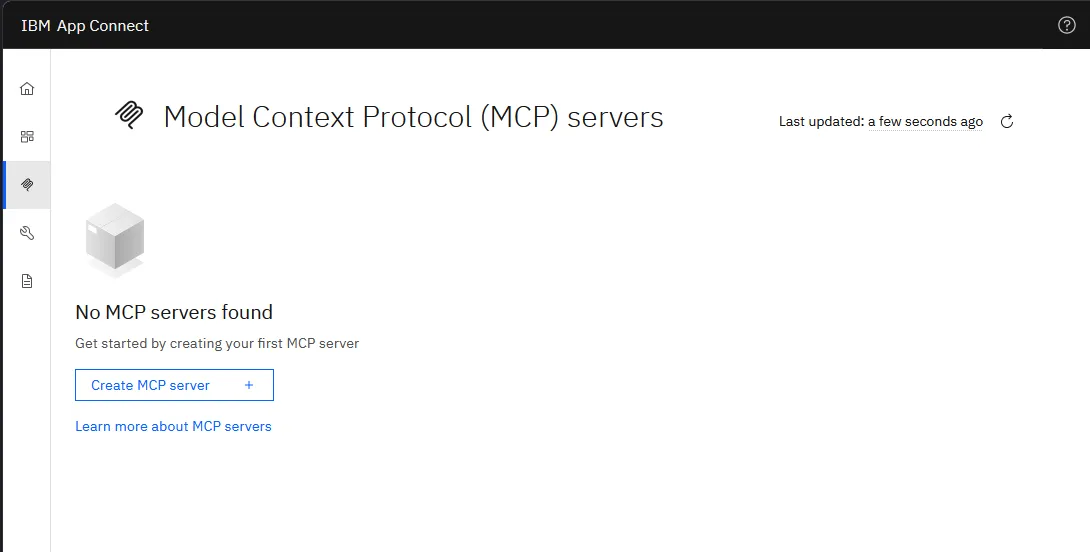
If you see this, you have MCP support. If you don’t see it, double-check resolvedVersion on the Dashboard CR.
Step 7: Update the repo to match reality
The upgrade is done in the cluster, but your YAML in source control still says tag: 12.14.0 and license: L-KPRV-AUG9NC.
Sync them so the next person (or future you) doesn’t accidentally roll back when they re-apply.
# ace-operator-values.yaml
operator:
  deployment:
    tag: 12.21.0          # bumped from 12.14.0
Don’t forget the license this time!
# ace-dashboard.yaml
spec:
  license:
    license: L-CKFT-S6CHZW   # bumped from L-KPRV-AUG9NC
If your IntegrationRuntime was created from the dashboard’s quickstart wizard (mine was), it lives only in the cluster and not in git. Now’s a good moment to capture it:
k get ir ir-01-quickstart -o yaml > ./ir-01-quickstart.yamlTrim the export before committing. Remove:
metadata.resourceVersionmetadata.uidmetadata.generationmetadata.creationTimestampmetadata.managedFieldsmetadata.ownerReferences- the entire
status:block
Keep:
metadata.namemetadata.namespacespec:
From this point on, the runtime is no longer UI-only. You can apply it declaratively.
Rollback
If something breaks on the operand side and the operator is fine, re-apply the backed-up CRs:
k apply -f ./backups/pre-13.0.6.2-r1/dashboard.yaml
k apply -f ./backups/pre-13.0.6.2-r1/ir-01-quickstart.yaml
The operator at 12.21.0 should still understand the 13.0.4.x operand, but the older license ID may complain. You may
need to keep L-CKFT-S6CHZW even on the rolled-back operand, depending on what the operator wants.
If the operator itself misbehaves, helm rollback works:
helm history ibm-appconnect -n ace-demo
helm rollback ibm-appconnect 1 -n ace-demo
This brings back the previous chart version. Note that operator rollback across chart majors is brittle. CRDs may have moved forward in ways the old controller can’t read. For development clusters, recreating the namespace from scratch is often less painful than fighting a half-rolled-back operator.
Long story short
The upgrade itself took five minutes. Everything around it took the afternoon.
References
- App Connect operand versions and features
- Creating and managing MCP servers in Designer
- ACE Operator on ArtifactHub
- ACE license identifiers (v13)
- Previous post: installing ACE on Minikube
- All the files used in this blog
Written by Matthias Blomme
#IBMChampion #AppConnectEnterprise(ACE) #k8s #AceOperator #AceDashboard #AceRuntime #ACECC #MCP